
V-Bridge
Trade the futures chart in ATAS, execute in MetaTrader 5
V-Bridge mirrors the direction of your ATAS position to one or more MetaTrader 5 accounts, always with a stop attached. You click in ATAS; the CFD opens and closes with it.
Available
What it does
ATAS is the master, MetaTrader 5 follows
V-Bridge is a system-tray service plus an ATAS indicator. The indicator watches the position on the chart you trade from; the service places the matching CFD order on the MetaTrader 5 accounts you tick.
- Mirrors the direction of the ATAS position, long or short, to one or more MetaTrader 5 accounts.
- Opens the CFD with a stop attached, every time.
- Sizes the trade by the mode you pick on each chart: Fixed risk, Follow ATAS or Percent Follow.
- Follows your ATAS stop and target moves (breakeven, trail, drag) in the Follow modes.
- Closes the CFD when your ATAS position goes flat.
- Adds and partial closes are not copied.
- ATAS is the master. You trade with Chart Trader as usual.
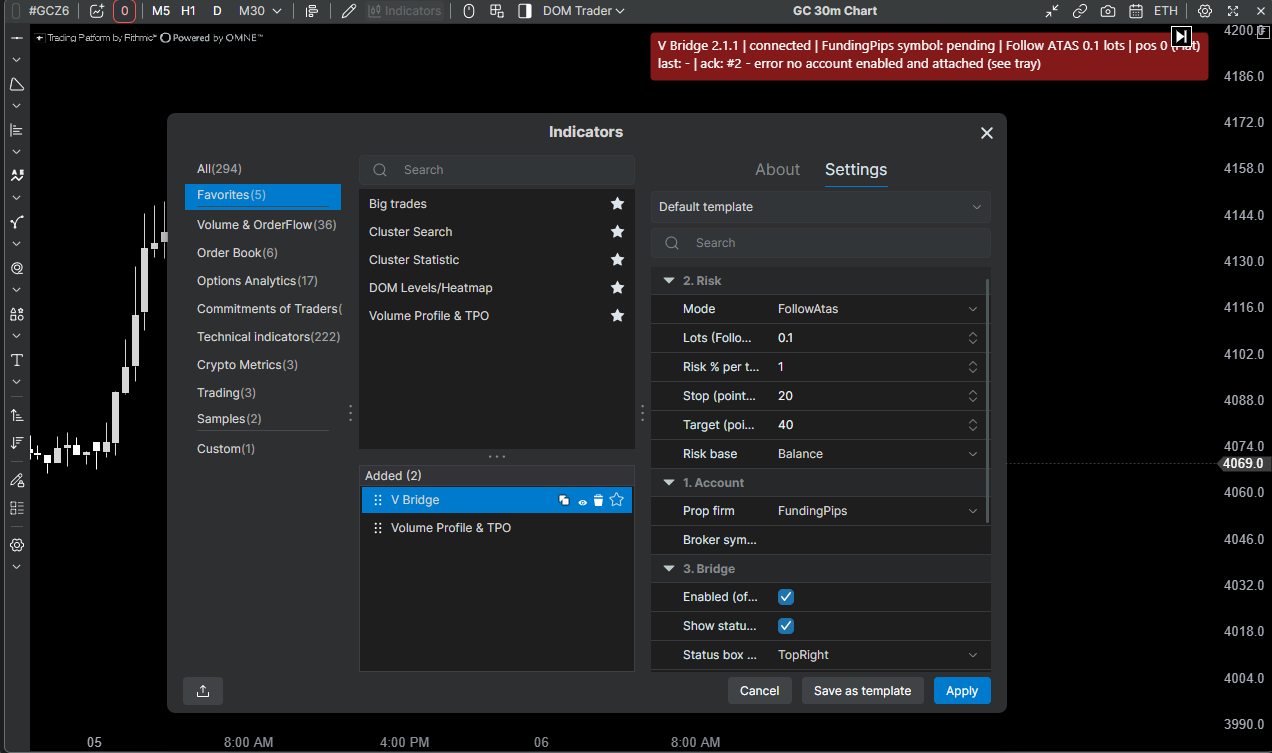
Execution modes
Three ways to size the CFD
| Mode | What it does |
|---|---|
| Fixed risk | The default. The bridge sizes the CFD from the risk % you set and uses its own stop and target distances in points. |
| Follow ATAS | Set your stop and target in ATAS Chart Trader before you click. MetaTrader 5 opens the lots you set, with the same stop and target distances from your fill, and follows when you move either. No ATAS stop within 1.5 s of the fill means nothing is opened. |
| Percent Follow | Like Follow ATAS, but you set a risk % instead of lots. The bridge sizes the trade from your ATAS stop distance, rounded down to the broker’s lot step. The size is set once at entry; later stop moves are followed but do not resize the trade. |
Safety rules built in
Rules the bridge will not break
- Never opens a CFD without a stop.
- Never rounds the lot size up. Below the broker minimum means no trade.
- Risk above 5% of the account per trade is refused.
- A stop wider than 5% of price is refused.
- A chart whose price is more than 3% away from the broker’s quote is blocked (wrong symbol).
- Only closes positions it opened itself. MetaTrader 5 is the source of truth for what is open.
- If the bridge was down when you clicked, the trade is not opened late at a worse price. The status box turns red so you know.
Requirements
What you need before you install
| Item | Requirement |
|---|---|
| Operating system | Windows. [TBD: supported Windows versions] |
| Charting | ATAS, installed and licensed by you. [TBD: supported ATAS versions] |
| Execution | MetaTrader 5 running and logged in, with the Algo Trading toolbar button on |
| Account | A prop-firm or broker account that allows automated trading (Expert Advisors) |
| Delivery | Windows installer (.exe). No administrator rights needed. |
Install
From download to a green status box
Run the installer
Download VBridge-Setup-<version>.exe from the releases page and run it. A V-Bridge icon appears in the system tray.
Tick your MetaTrader 5 account
Open Accounts in the tray menu and tick the account to trade. New accounts stay off until you tick them.
Add the indicator to the chart
In ATAS, add the V-Bridge indicator to the chart you trade from and pick the mode and risk. The status box turns green and shows the broker symbol it resolved.
Free software under the GNU GPL v3. It comes with no warranty: you are responsible for how you trade with it and for your prop firm’s rules.
FAQ
Questions before you install
Does V-Bridge copy my adds and partial closes?
No. It mirrors the direction of the position and the flat. An add in ATAS does not resize the CFD, and a partial close in ATAS does not partially close it. When the ATAS position goes flat, the CFD closes.
What happens if the bridge was down when I clicked?
Nothing is opened late at a worse price. The status box on the chart turns red with the reason, so you know the CFD side did not fire.
Where do I get help?
Questions and bug reports go to Telegram at t.me/R4ND0MQB1T or to an issue on GitHub. Attach the zip from the tray’s Export diagnostics; it never contains your token.